Private document signing · Made in India
Sign documents privately.
On your own device.
SignVault signs PDFs, Word files and pictures in your browser. Your documents never leave your computer, and your account is stored online encrypted with your password, so you can sign in anywhere: not even we can read it.
Start the 3-day free trial Verify a document
No payment details needed for the trial. Checking signatures (Verify) is always free.
- No uploadsDocuments are signed in your browser and stay on your device.
- No trackingNo analytics, no cookies, no advertising.
- Works offlineThe Desktop copy runs from your computer or a pen drive.
- Free for recipientsSigning what you were sent, and Verify, never need a plan.
How it works
Create your account
Confirm your email, verify your identity with your PAN and an ID, and draw or upload your signature. Type your name, choose a password and draw or upload your signature. SignVault makes your digital ID on your device and gives you a recovery key.
Open a document
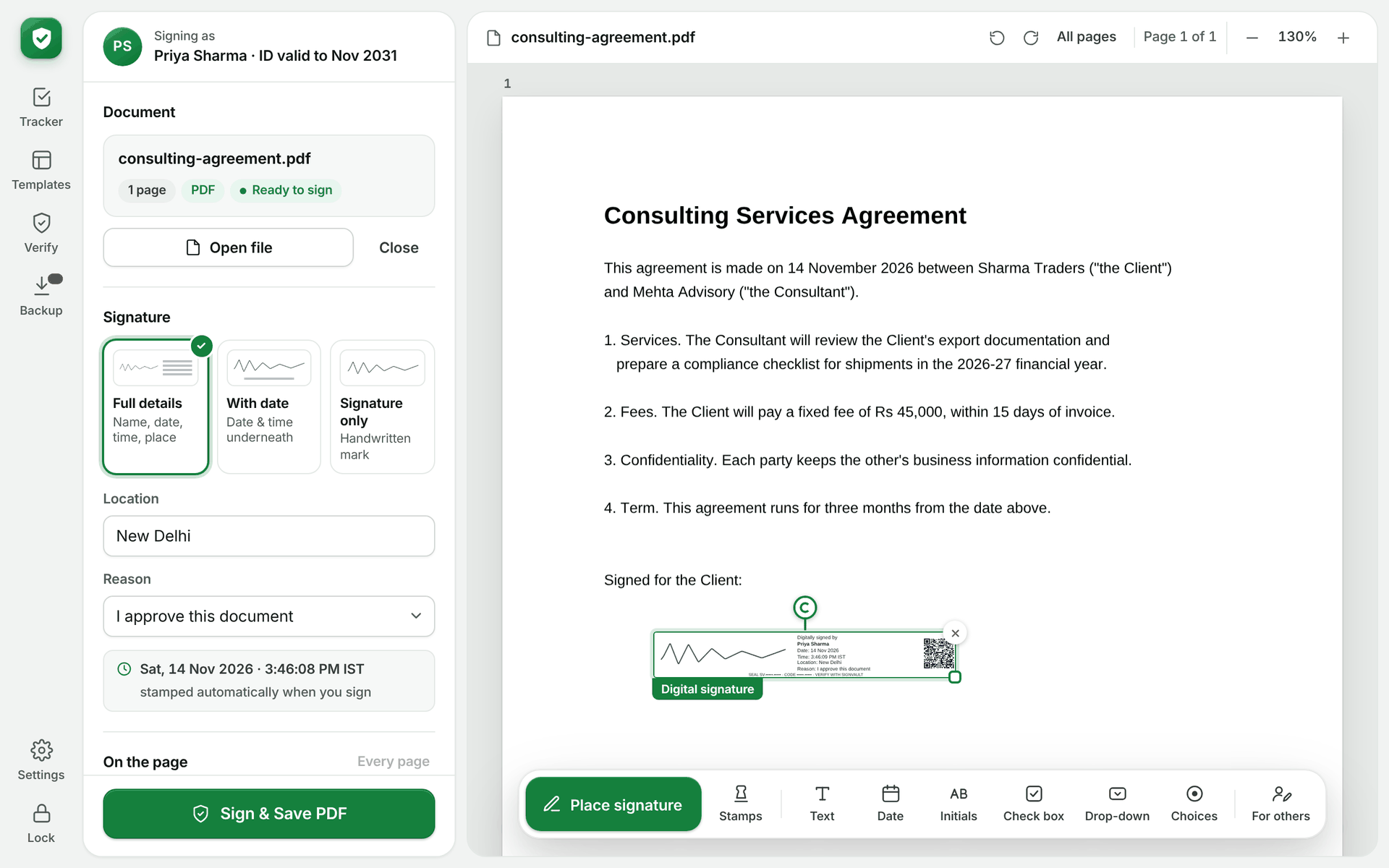
Drop a PDF, Word file or picture. Place your signature, stamps, date, text or initials exactly where they belong.
Sign and save
You get a cryptographically signed PDF. Anyone can check it in SignVault Verify or Adobe Acrobat Reader: a later change always shows.
Everything you need to get documents signed
Sign
PDFs, Word files and pictures, with a visible signature and a digital signature in one step. Three signature styles, with date, place and reason.
Fill and prepare
Add text, dates, initials, check boxes, drop-downs and choice buttons, and signature fields for other people.
Send for signing
Ask others to sign one after another or all at once, with a sign-by date, a tracker and a completion report. Pro
Templates
Prepare a document once and reuse it. Share templates with your team as a file. Pro
Stamps and seals
Ready-made stamps, your own company seal, and a security seal with a serial number and QR code on every signature.
Verify
Check any signed PDF: the signatures in it, the times they record, and whether anything changed afterwards. Free, and no account is needed.
Three ways to sign
SignVault digital ID
Your own certificate, made on your device. Sign PDFs, Word files and pictures in seconds. Included in every plan.
DSC on a USB token Coming soon
Sign with your Class 3 Digital Signature Certificate from a licensed Certifying Authority (IT Act s.3). The key stays on the token.
Aadhaar eSign Coming soon
Sign with a one-time password to your Aadhaar-linked mobile, through a licensed eSign provider (IT Act s.3A). Only the document's fingerprint is sent.
DSC and Aadhaar eSign are being connected to our partners and will be switched on when ready.
How SignVault is different
| SignVault | Typical online signing service | |
|---|---|---|
| Where your document goes | Nowhere: it is signed on your device | Uploaded to the provider's servers |
| Who can read it | Only you and the people you send it to | The provider can, and so can anyone who breaks into it |
| Your signature and keys | Encrypted with your password before they are stored; we can’t read them | Held by the provider |
| Without internet | Desktop copy works fully offline | Does not work |
| Recipients | Sign free, no plan needed | Usually free |
| Renewal | Never automatic | Usually charged automatically |
| Checks who the signer is | No: your digital ID is self-issued (DSC and Aadhaar eSign are coming) | Some do, by email, OTP or ID check |
Who SignVault is for
Small businesses (MSMEs)
Vendor agreements, purchase orders, quotations and NDAs signed in minutes, without printing.
CA and tax firms
Engagement letters, client authorisations and confirmations signed by clients from their phones.
Freelancers and consultants
Proposals, contracts and statements of work signed by clients before you start work.
HR and recruiting
Offer letters, appointment letters, NDAs and policy acknowledgements signed by new joiners.
Real estate brokers
Broker agreements, booking forms and rental agreements signed by buyers, tenants and owners.
Lawyers and law firms
Client engagement letters, NDAs and settlement drafts signed without client documents leaving your office.
- Startups
- IT and software services
- Staffing and manpower agencies
- Schools and coaching institutes
- Colleges and universities
- Hospitals and clinics
- Diagnostic labs
- Pharma distributors and pharmacies
- Insurance agents and brokers
- Financial advisers and MF distributors
- NBFCs and loan DSAs
- Co-operative societies
- Housing societies and RWAs
- Builders and developers
- Construction contractors
- Interior designers and architects
- Manufacturers
- Exporters and importers
- Logistics and transport
- Retail and franchise businesses
- E-commerce sellers and D2C brands
- Restaurants and cloud kitchens
- Hotels and travel agencies
- Event and wedding planners
- Creators and media
- Marketing and ad agencies
- NGOs and trusts
- Gyms and fitness studios
- Salons and spas
- Automobile dealers
- Security and facility management
- Agri businesses and FPOs
- Government contractors and vendors
- Landlords and property owners
Documents you can sign with SignVault
- Offer letter
- NDA
- Rental agreement
- Invoice
- Purchase order
- Quotation
- Engagement letter
- Consent form
- MoU
- Vendor agreement
- Appointment letter
- Board resolution
- Work order
- Admission form
- Proposal or SOW
Guides
- How to sign a PDF online in India
- How to sign a PDF on your phone
- How to add a signature to a Word document
- Is an electronic signature valid in India?
- Which documents cannot be signed electronically in India?
- How to verify a digital signature on a PDF
Simple pricing
Individual
₹1,499/year
1 person
Company
₹2,999/year
Up to 5 people
Business
₹6,999/year
Up to 25 people
Custom
Contact us
As agreed
Desktop
₹3,999/first year
1 person, works offline
3-day free trial of every feature. No automatic renewal. Compare plans
Common questions
Can SignVault see my documents?
No. Documents are opened and signed in your browser and never uploaded. Your account (name, signature picture, digital ID) is encrypted with your password in your browser and only then stored online, so we cannot read it.
What if I forget my password?
We can reset your sign-in with a code sent to your email, but only the recovery key you saved when you created your account can open your encrypted account. Keep it safe.
Why do you ask for my ID?
So that every signature made with SignVault comes from a person whose identity we have checked, and to give one free trial per person. You give your PAN and a photo or scan of one ID (PAN card, masked Aadhaar, passport, driving licence or voter ID). We never ask for a full Aadhaar number. The pictures are deleted 30 days after our decision.
Is a SignVault signature legally valid?
Whether a signature is accepted depends on the document, the law, the recipient and the evidence. A SignVault digital ID is a self-issued cryptographic PDF signature: it is not issued by a Certifying Authority, it is not a DSC or Aadhaar eSign, and it does not verify identity or authority. For documents or recipients that need a DSC or Aadhaar eSign, use those methods. Some documents (negotiable instruments other than certain cheques and specified notes, powers of attorney other than certain regulated-entity powers, trusts, and wills) are in the First Schedule of the IT Act and cannot be signed electronically, and stamp duty, registration and filing-portal rules still apply.
Before you rely on it
A SignVault digital ID is a self-issued cryptographic PDF signature: it is not a DSC or Aadhaar eSign, and SignVault does not verify identity, authority or consent. Check that the law, the portal or the recipient accepts it before use. Some documents (negotiable instruments other than certain cheques and specified notes, powers of attorney other than certain regulated-entity powers, trusts, and wills) are in the First Schedule of the IT Act and cannot be signed electronically, and stamp duty, registration and filing-portal rules still apply. Read the terms and use the method your document requires.
Sign your first document in two minutes
Create your account, draw your signature, and sign. Nothing to install, no payment details.